BASIC for system design interviews: the most reliable sequence for thinking at architecture scale
System design interviews are not just “bigger coding interviews.”
They are ambiguous on purpose. The interviewer wants to see whether you can turn a fuzzy product prompt into a coherent architecture, ask the right questions, identify the real bottlenecks, make trade-offs in public, and check your own design for scale, reliability, security, and operational sanity. That is why so many otherwise strong engineers struggle: they know a lot of components, but they do not have a stable order for using them.
BASIC gives you that order.
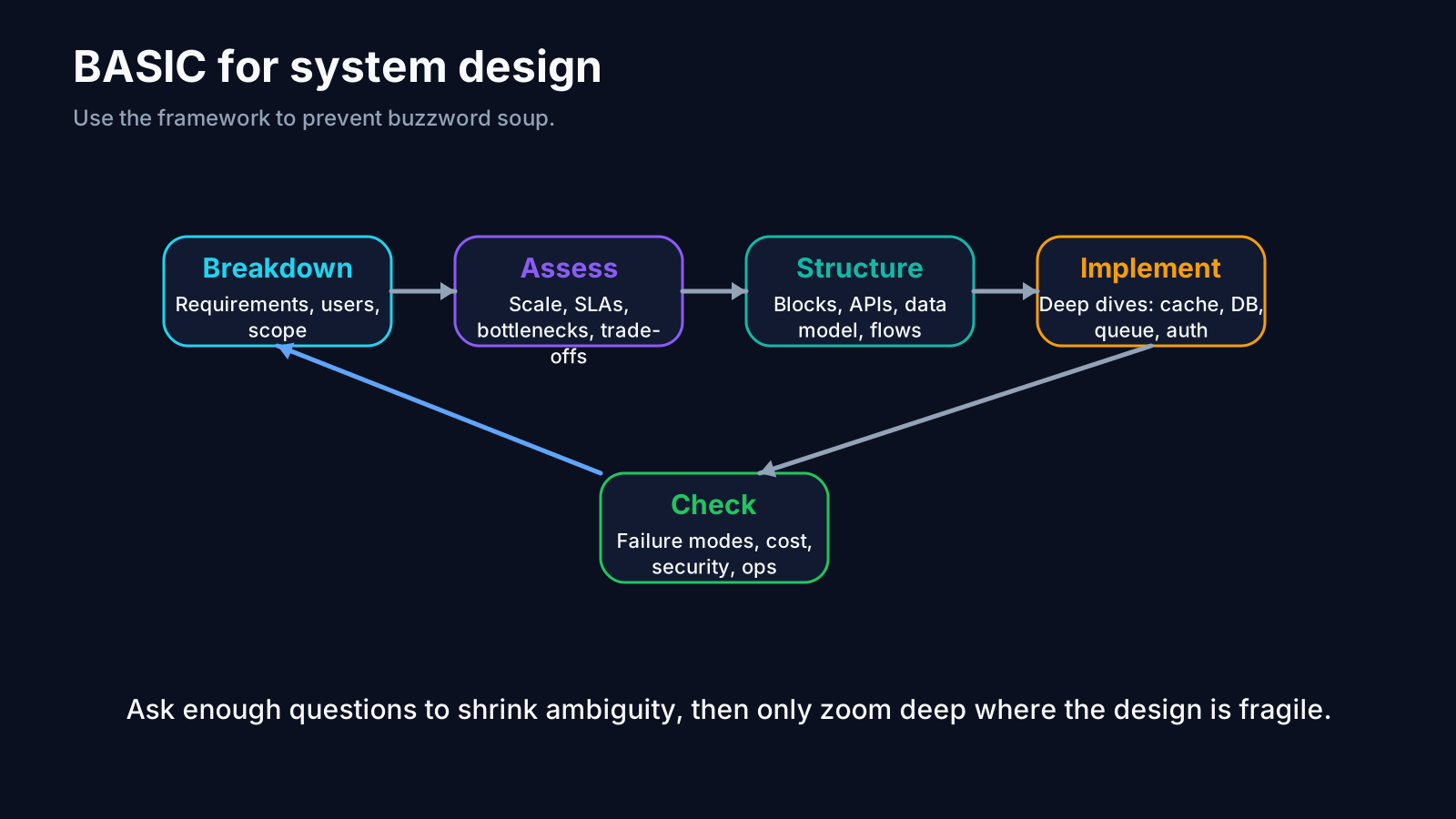
Breakdown, Assess, Structure, Implement, Check is an unusually good fit for system design because system design is really a sequence-management problem. The candidate who wins is usually not the one who lists the most services. It is the one who keeps the conversation in the right order. Employer and interview-prep guidance on system design repeatedly emphasizes requirement gathering, practicality, trade-offs, scalability, reliability, and validation. BASIC maps naturally onto that rhythm. S9 S10 S14 S15
Why people fail system design interviews
There are five classic failure modes in system design rounds:
- They start drawing boxes before clarifying requirements.
- They name technologies without explaining why they fit.
- They jump to “massive scale” features before establishing the base design.
- They never connect component choices to workload shape.
- They end without checking bottlenecks, failure modes, or trade-offs.
In other words: they solve from the middle.
BASIC solves that by forcing you to separate the problem into stages.
Breakdown: reduce ambiguity before architecture starts
In system design, Breakdown is not optional. It is the stage that decides whether the rest of the interview is grounded or speculative.
At Breakdown, you identify:
- the core product use case
- the critical user flows
- what must happen in version one versus what can be deferred
- the scale assumptions
- the primary non-functional requirements
- the read/write pattern
- the business constraints
- the failure tolerance
For a prompt like Design a notification service, Breakdown might sound like:
“Let me clarify whether we are sending email, push, SMS, or all three.
Are we optimizing for guaranteed delivery, low latency, or operator cost?
Is this one-to-one messaging, fanout to many users, or both?
What is the expected QPS and peak fanout pattern?”
That sequence matters because a notification service for security alerts is not the same design as a marketing blast engine. A URL shortener is not the same design as Dropbox. A chat app is not the same design as a payment ledger.
ByteByteGo’s system design flow explicitly begins with clarifying requirements and estimating scale before committing to architecture. Amazon’s SDE interview guidance likewise emphasizes that system design responses should show practicality, reliability, and scalability, which is impossible if the requirements were never pinned down. S9 S15
Assess: find the real trade-offs before you overbuild
Once the prompt is defined, Assess is where you ask: what will actually make this system hard?
In coding interviews, Assess often means comparing algorithms. In system design, it means comparing architectural pressures:
- latency versus throughput
- consistency versus availability
- cost versus performance
- simplicity versus extensibility
- synchronous versus asynchronous processing
- hot-path speed versus durability guarantees
This is the stage where you identify the likely bottlenecks:
- read-heavy or write-heavy traffic
- bursty fanout
- skewed keys
- cold-start latency
- storage growth
- queue backlogs
- cross-region replication
- failure recovery
- abuse and rate-limit pressure
A strong candidate does not treat every prompt as “use microservices, Redis, Kafka, and sharding.” A strong candidate asks which of those pressures are real in this system.
A good Assess statement sounds like:
“The hardest part here is not basic CRUD. It is handling bursty fanout while keeping delivery durable and avoiding duplicate sends.
That pushes us toward an asynchronous pipeline, idempotent processing, and backpressure-aware workers.”
That is strong because it narrows the design around actual difficulty.
Structure: turn trade-offs into an architecture skeleton
Once you have the problem shape and the dominant trade-offs, Structure is where you produce the first clean architecture.
This is the most visible part of the interview, but it should not be the first part. If Breakdown and Assess were done well, Structure becomes far easier.
In system design, Structure usually includes:
- the high-level component map
- API boundaries
- the core data model
- the request or event flow
- the storage choices
- the caching strategy
- the async/sync split
- the scaling path for critical components
For the notification-service example, a strong structural sketch might be:
- API gateway receives notification requests.
- Auth and rate limiting protect the ingress.
- Requests are written durably to a primary store.
- A message queue decouples ingestion from delivery.
- Worker pools handle channel-specific delivery (email, SMS, push).
- Idempotency keys prevent duplicate sends.
- Delivery status is written back to a store for client visibility.
- Observability captures queue lag, send failures, retries, and channel health.
That is already a design worth discussing. It can be refined later with batching, fanout services, template rendering, preference storage, retry policies, and dead-letter queues. But the skeleton exists.
Structure is also where you choose the depth of explanation. Not every box deserves equal airtime. Spend time where the scale or correctness risk actually lives.
Implement: “implementation” in system design means constructing the design live
Unlike LeetCode, system design implementation usually does not mean writing production code. It means walking the architecture into existence in a logically controlled order.
That sounds abstract, but in practice it means:
- drawing the core flow first
- explaining one user journey end to end
- deepening only the components that matter most
- layering features after the baseline works
- answering follow-up questions without losing the main thread
This stage is where a lot of candidates derail themselves. They try to speak about every subsystem simultaneously. BASIC helps because you already have the order.
A clean system-design Implement sequence often sounds like this:
“I’ll start with the base path for a successful request.
Then I’ll zoom in on storage and delivery workers.
After that I’ll cover retries, idempotency, and observability.
Finally I’ll talk about scaling and failure handling.”
That sounds controlled because it is controlled.
This is also the stage where you turn abstractions into concrete choices. If you mention a queue, explain what it buys you. If you mention a cache, explain what key shape it uses and what invalidation strategy is acceptable. If you mention partitioning, explain the partition key and the trade-off around hotspots.
Check: the difference between a diagram and an interview-ready design
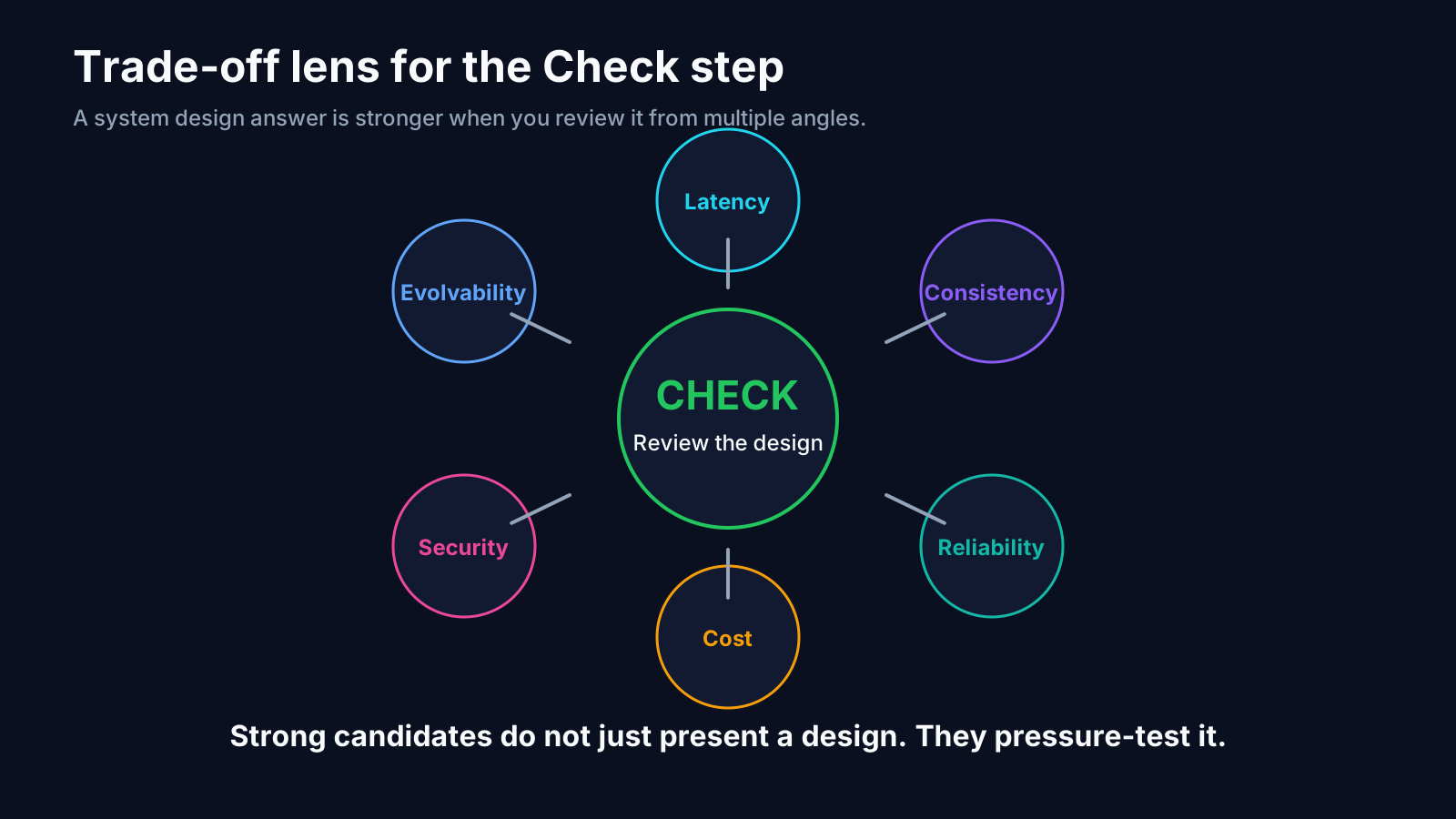
The Check phase is what elevates a system design answer from “plausible” to “defensible.”
At Check, you do not redraw the system. You evaluate it.
A useful system-design Check asks:
- Where is the first bottleneck likely to appear?
- What happens if a dependency fails?
- What are the correctness risks?
- What are the operational risks?
- How will we observe the system?
- What is the data consistency story?
- How will we scale the hot path?
- What security or abuse vector did we ignore?
- What cost driver grows fastest?
In other words, Check is a deliberate design review.
This is why BASIC fits system design so well. The architecture interview is not just an exercise in component naming. It is a live version of requirements analysis, system construction, and design review. BASIC mirrors that exact flow.
Check is also where you should explicitly revisit non-functional requirements. If the interviewer said low latency matters most, say whether the design meets it. If durability matters most, say where the write becomes durable. If global scale matters, say what must become multi-region and what does not have to on day one.
Example: using BASIC on “Design a notification service”
Let’s walk it through.
Breakdown
Clarify channels, recipient types, delivery guarantees, user preferences, peak volume, and acceptable delay. Separate transactional alerts from marketing fanout.
Assess
The hard parts are durable ingestion, burst handling, duplicate prevention, retries, and channel-specific provider failures. Because of that, an async pipeline is a better fit than a fully synchronous request path.
Structure
Propose ingress API, auth/rate limiting, durable write, message queue, worker pools, preference service, template renderer, status store, retry logic, dead-letter handling, and monitoring.
Implement
Walk through a request:
client -> API -> validation/auth -> durable write -> queue -> worker -> provider -> status update -> callbacks / UI read path
Then zoom in on the retry and idempotency paths.
Check
Confirm what happens when a provider is down, when queue lag spikes, when one tenant causes traffic bursts, when a user opts out mid-flight, and when delivery receipts arrive late or out of order.
That is a strong answer because it is sequential. The candidate is leading the conversation instead of reacting randomly.
BASIC also improves how you prepare for system design
A strong BASIC-based prep loop for system design looks like this:
Breakdown drills
Take a prompt and spend five minutes doing only requirement clarification. Do not draw anything yet.
Assess drills
List the top three trade-offs for the system. Ask which of them is dominant.
Structure drills
Sketch a minimal viable architecture on one page. Force yourself to keep it simple first.
Implement drills
Explain the design out loud from client request to persistence to background work to read path.
Check drills
End every mock by naming bottlenecks, failure modes, observability, security, and future scaling steps.
That prep method is much better than memorizing “system design answers.” It builds design behavior, not just design vocabulary.
Common system design mistakes BASIC helps prevent
1. Premature depth
You deep-dive into sharding before proving the base system works.
2. Component dumping
You list tools without connecting them to user needs or trade-offs.
3. Lost thread
You answer follow-ups by starting new designs instead of extending the existing one.
4. No review loop
You stop after the first architecture draft and never evaluate it.
5. Scope drift
You accidentally design a platform ten times larger than the prompt required.
BASIC addresses each one directly:
- Breakdown keeps scope honest.
- Assess keeps trade-offs explicit.
- Structure keeps the diagram coherent.
- Implement keeps the walkthrough ordered.
- Check forces evaluation and refinement.
What to say in a system design interview
A BASIC-style system design script often sounds like this:
- “Let me clarify the main use case and the highest-priority non-functional requirement.”
- “Given that traffic pattern, the hardest part is probably …”
- “I’ll propose a simple baseline first, then scale the risky parts.”
- “Here is the end-to-end request flow.”
- “Now I’ll zoom in on the queue / storage / cache because that is where the main trade-off lives.”
- “Before I stop, I want to review failure modes, observability, and the next scaling step.”
That script works because it gives the interviewer signposts.
BASIC is especially valuable for senior candidates
The more senior the role, the less interviewers care about box-counting and the more they care about judgment.
Senior and staff system design interviews often probe:
- where to simplify
- where to introduce complexity
- what to defer
- how to reason about operational cost
- how to design for reliability without overbuilding
- how to connect business requirements to architecture choices
Those are all Assess-and-Check heavy activities. BASIC makes room for them because it prevents the conversation from collapsing into drawing first and defending later.
Bottom line
System design interviews reward candidates who can move from ambiguity to architecture to review in a controlled sequence. BASIC is built for exactly that motion. Breakdown clarifies the system before design begins. Assess identifies the dominant trade-offs. Structure turns the design into a visible architecture. Implement walks that architecture into existence in a logical order. Check reviews scalability, reliability, security, and operational sanity before the interviewer has to ask.
That is why BASIC is so effective for system design: it does not just help you name components. It helps you think like a designer.
References used in this post
Why this matters even more for senior design rounds
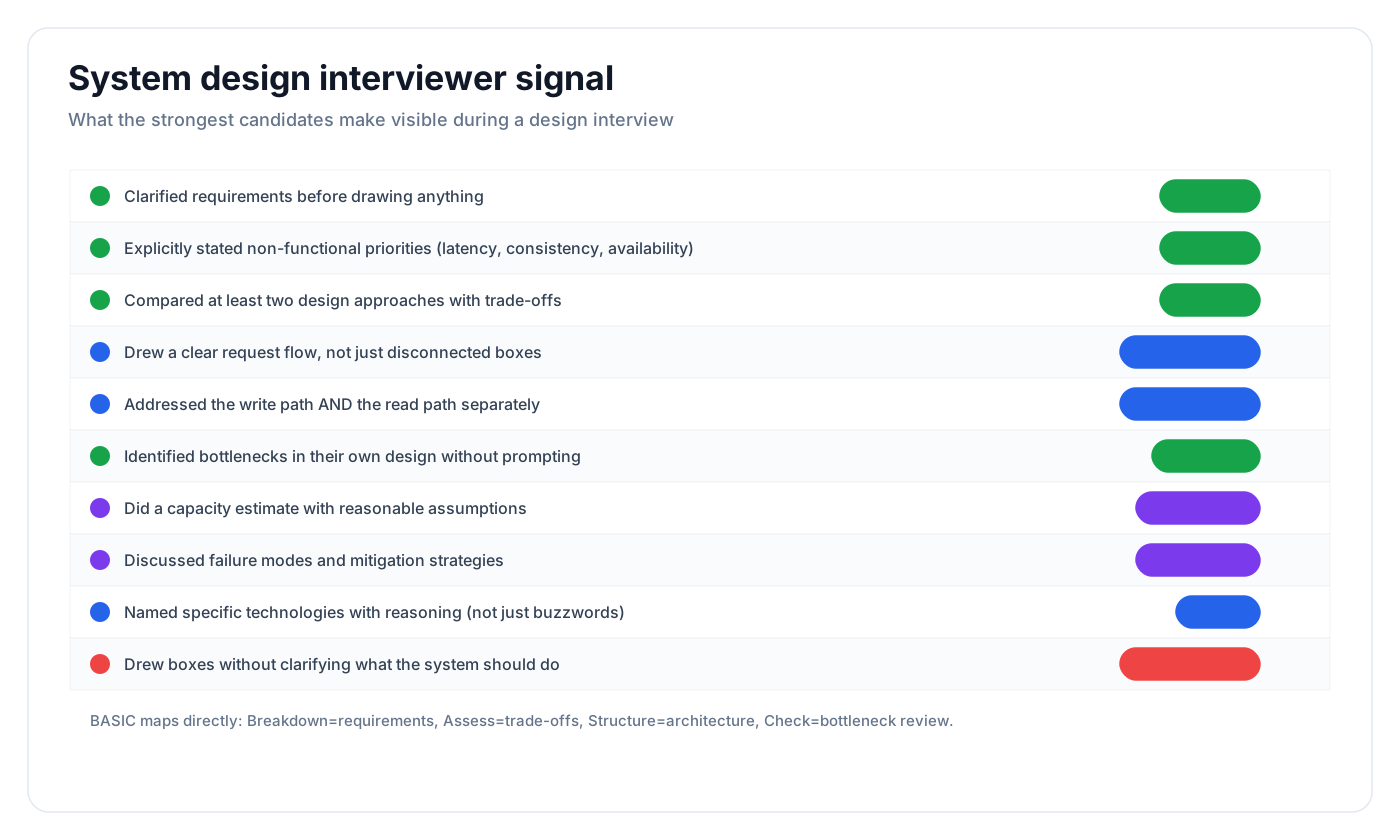
Senior system design interviews are rarely won by naming more infrastructure. They are won by showing better judgment about where clarity, trade-offs, and risk review belong.
BASIC is strong here because it prevents three common senior-level mistakes:
- answering a different product than the one asked
- doing architecture theater without prioritization
- skipping the bottleneck and failure-mode review because the diagram looks impressive
The framework keeps the conversation attached to the actual system, not to the candidate’s favorite components.